
Claim $300 Free Compute! 30-Day Vultr Serverless Inference Guide for DeepSeek V4.1 Flash & GLM-5.3-Flash
In September 2026, leading global cloud infrastructure provider Vultr introduced a high-value promotional compute initiative for developers. New users who sign up through the dedicated referral channel and complete basic account verification receive $300 in free trial credits, valid for a full 30 days.
Crucially, this balance is not restricted to standard cloud VPS instances—it fully covers Vultr's official Serverless Inference platform. The supported model roster features the latest coding and reasoning flagship DeepSeek V4.1 Flash alongside GLM-5.3-Flash, Qwen 3.8 Flash Next, and image generation models like Z-Image Turbo. Backed by native OpenAI API compatibility, full-stack developers can seamlessly connect this compute pool to Cursor, Claude Code, Codex, Pi, or ZCode at zero personal cost for an entire month.
💡 Key Highlights
- 💰 $300 Real Trial Balance: New users registering through the dedicated referral link receive $300 in free promotional credit valid for 30 days.
- 🚀 Immediate DeepSeek V4.1 Flash Support: Direct access to DeepSeek's latest Mixture-of-Experts (MoE) coding and reasoning engine, featuring sub-second time-to-first-token and advanced multi-step planning.
- 🌐 Native OpenAI API Compatibility: Standardized Base URL at
https://api.vultrinference.com/v1, requiring no intermediary reverse proxies or custom adapters. - 🛠️ Rapid Coding Agent Integration: Plug-and-play setup with Cursor, Claude Code, Codex, Pi, and ZCode in under three minutes for automated refactoring and testing.
- 🛡️ Built-in Protection Against Unexpected Charges: Practical advice on calendar reminders, console billing alerts, and credit expiration handling to ensure a completely risk-free trial.
🔥 1. Promotion Details & Token Economics: How Far Does $300 Go?
For developers relying heavily on AI programming assistants, monthly subscriptions for closed-source models can quickly accumulate. Meanwhile, self-hosting open-weight models on dedicated GPU cloud instances incurs steep idle hourly costs alongside complex driver and container orchestration.
Vultr Serverless Inference solves both problems through a purely usage-based (per-token) billing model: you only pay when an API request is dispatched, and the $300 trial credit acts as a massive pre-funded token reserve.
1. Token Value Breakdown: Hundreds of Millions of Free Tokens
Taking DeepSeek V4.1 Flash official pricing as an example:
- Input price: $0.15 per 1M Tokens
- Output price: $0.60 per 1M Tokens
Converting $300 into real-world software engineering throughput:
- Inputting full codebases and context documentation can yield over 2 billion input tokens;
- With balanced real-world coding generation ratios (1:1 or 1:2 input-to-output), this delivers between 300 million and 500 million blended tokens;
- This is equivalent to refactoring tens of thousands of medium-to-large modules and executing comprehensive automated test suites.
Even for full-stack engineers writing code with AI agents for 8+ hours a day, exhausting a $300 balance within 30 days is nearly impossible.
2. Diverse Open-Source Model Ecosystem
Beyond flagship coding models like DeepSeek V4.1 Flash, Vultr Serverless Inference hosts an expansive multi-domain open-source ecosystem accessible via a single API key:
- GLM 5.3: Zhipu AI's current flagship language model, ideal for deep architectural analysis and complex multi-step debugging;
- Z-Image Turbo: High-speed image generation model capable of synthesizing visual assets from text prompts with zero output token fees;
- BGE M3: BAAI's premier multi-lingual embedding model, essential for document chunking and dense RAG retrieval;
- Vultron Retriever Core 4.5B / Flash 0.8B: Vultr's specialized semantic retrieval stack for building low-latency knowledge base search pipelines;
- Nemotron 3.5 Content Safety: NVIDIA's guardrail and safety classification model for filtering jailbreak prompts and securing public API gateways;
- Muse Glimmer 30B: Tailored for creative writing, narrative ideation, and conversational roleplay.
🛠️ 2. Step-by-Step API Key Setup
Step 1: Register via the Dedicated Referral Link
Open your browser and navigate to the official promotional portal: 👉 https://www.vultr.com/?ref=9923295-9J
Enter your email address and a strong password to create an account, then verify your address via the confirmation link sent to your inbox.
Step 2: Verify Identity with a Payment Method
Log in to the Vultr Console and navigate to the Billing section to verify your account identity.
Link a valid international credit card (Visa, MasterCard, or American Express) or submit a small deposit via PayPal. As a publicly compliant cloud provider, Vultr enforces this step to prevent bot farms and abusive multi-accounting. Once verified, the $300 promotional credit appears in your billing balance.
Step 3: Enable Serverless Inference and Copy Your API Key
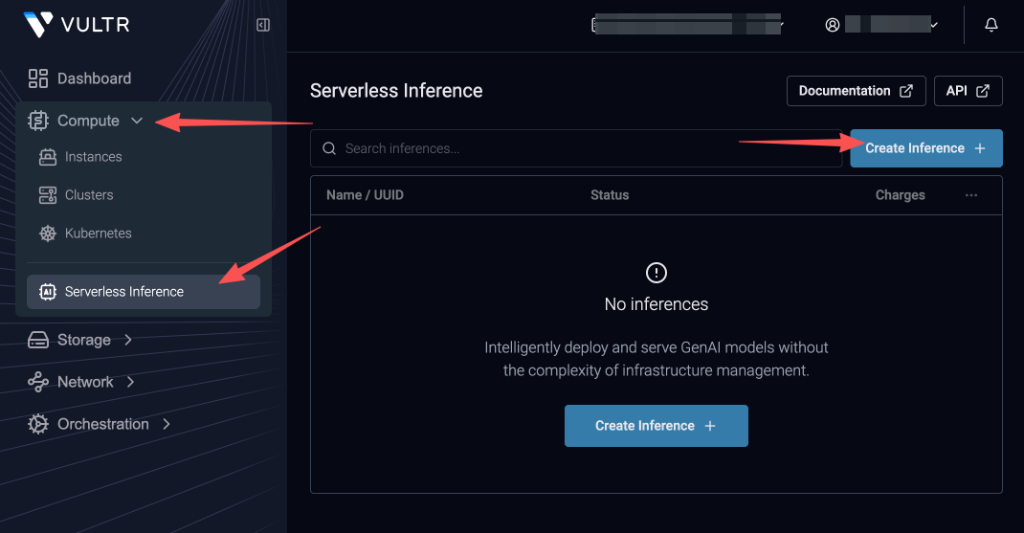
- In the left navigation menu, expand Compute and select Serverless Inference;
- If this is your first visit, click the Create Inference + button in the center or top right;
- Once the inference instance is created, click into it, copy your API key, and store it securely in your local environment or password manager;
- The official OpenAI-compatible Base URL is:
https://api.vultrinference.com/v1.
💻 3. IDE & Coding Agent Setup
Because Vultr Serverless Inference conforms strictly to the OpenAI API specification, connecting modern developer tools takes only a few minutes.
1. Cursor Setup
- Open Cursor and navigate to Settings via
Cmd + ,or the gear icon; - Select the Models tab in the sidebar;
- Expand OpenAI API Key and paste your Vultr API key;
- Toggle Override OpenAI Base URL to ON and set the address to:
https://api.vultrinference.com/v1; - Under Model List, click Add Model and input:
DeepSeek-V4.1-Flash. Save your changes.
2. Claude Code Setup
In terminal environments, redirect the OpenAI-compatible environment variables before launching your coding agent:
export OPENAI_BASE_URL="https://api.vultrinference.com/v1"
export OPENAI_API_KEY="your_vultr_api_key_here"
Configure your client runner to target DeepSeek-V4.1-Flash as the default model.
3. Codex, Pi, and ZCode Integration
In the settings panel of Codex, Pi, or ZCode, choose the Custom OpenAI Provider option:
- API Base URL:
https://api.vultrinference.com/v1 - API Key: Your Vultr API Key
- Model Name:
DeepSeek-V4.1-Flash(for reasoning and deep code generation) orQwen-3.8-Flash-Next(for lightweight streaming completions)
4. Direct API Invocation Examples
cURL Terminal Request
curl https://api.vultrinference.com/v1/chat/completions \
  -H "Authorization: Bearer $VULTR_API_KEY" \
  -H "Content-Type: application/json" \
  -d '{
    "model": "DeepSeek-V4.1-Flash",
    "messages": [
      {"role": "system", "content": "You are a professional full-stack engineer."},
      {"role": "user", "content": "Write a clean TypeScript helper function to debounce asynchronous promises with immediate execution."}
    ],
    "temperature": 0.2
  }'
Python SDK Call
from openai import OpenAI

client = OpenAI(
    base_url="https://api.vultrinference.com/v1",
    api_key="YOUR_VULTR_API_KEY",
)

response = client.chat.completions.create(
    model="DeepSeek-V4.1-Flash",
    messages=[
        {"role": "system", "content": "You are a professional full-stack engineer."},
        {"role": "user", "content": "Write a clean TypeScript helper function to debounce asynchronous promises with immediate execution."}
    ],
    temperature=0.2,
)

print(response.choices[0].message.content)
⚠️ 4. Essential Safety & Anti-Overcharge Guidelines
To maximize the benefit of this promotion without unexpected costs, implement these best practices upon account activation:
1. Act Immediately and Schedule a Calendar Reminder
The promotional $300 balance expires strictly after 30 days; any unused credits are automatically rescinded by the system.
Best Practice: Begin using the credits immediately upon activation. If you embed this API into active production services, set a calendar notification for the 28th day to evaluate whether to stay on Vultr or transition to another provider.
2. Configure Console Spending Alerts
To avoid unexpected charges to your credit card if your consumption exceeds the trial balance or runs past the expiration date:
- Enable Billing Alerts: Turn on email notifications under Billing settings to receive alerts before charges occur;
- Delete or Disable Keys: If you do not plan to continue as a paying customer after day 30, simply delete or revoke your API key in the Serverless Inference dashboard to immediately halt all billable traffic.
3. Verification Best Practices
To ensure a smooth registration and avoid fraud-filter false positives:
- Use a clean residential or corporate internet connection rather than shared proxy nodes;
- Ensure the billing address you enter matches the registration records of your credit card;
- If your credit card is declined by automated fraud filters, verify using an international PayPal account with a small deposit.
💡 5. Long-Term Compute Strategy Comparison
A $300 trial provides a month-long sprint, ideal for major code refactors, MVP launches, or intensive research. Once the trial concludes, evaluate these sustainable long-term options:
- OpenCode Go: Offers $15 to $60 in compute credits for $10/month, comprehensive model coverage across proprietary and open architectures, and seamless international payment options; 👉 OpenCode Go Exclusive Portal: https://opencode.ai/go?ref=SVE58K5K80
- Command Code GOAT Plan: Delivers $70 in usage credits for $10/month (7x leverage) alongside neuro-symbolic code style memory and automatic tool-call self-healing.
A balanced approach leverages Vultr's $300 trial for heavy DeepSeek V4.1 Flash inference while maintaining a reliable, low-cost subscription like OpenCode Go as a primary daily driver.
📬 Subscribe to Free AI API for Verified Intelligence
Model pricing adjustments, zero-cost API promotions, and compute grants evolve constantly.
Follow Free AI API and subscribe to our newsletter to receive independently verified developer benchmarks, timely discount alerts, and zero-cost API guides.
Community Feedback
Comments are tied to your GitHub account — sign in to join the discussion.